Google Voice is a bit confusing and I am still learning how to use it fully. Basically you are assigned what I call a 'Universal" phone number to give out to friends, family and clients. Thus you don't have to give out your real phone numbers to others. The thing about Google Voice is that it provides a central place to get your voicemail and also allows you to forward this Universal phone number to your home phone, your celll phone, your business phone and also to your Google Chat (Google Chat is also known as Google Talk which is basically a way to chat or talk via your computer to other people's phones using your microphone).
Google Voicemail is available on your Google Voice profile where you can listen to your messages via your headset or speakers on your computer. Google even provides a free service that can transcribe any audio voice message and email you the text of this voicemail. These transcriptions aren't always entirely right and at times can be quite funny to read.
A few weeks ago, I noticed that there were options available for these voicemails, that I found intriguing. You can get the EMBED code for this voicemail message and put it on other sites. YES, you guessed it - another way to get audio to your blog.
The voicemail is restricted to 3 minutes as far as I can tell, but you could do continual sections or parts to EMBED if you really have to go on and on.
Tweet
Showing posts with label Google Voice. Show all posts
Showing posts with label Google Voice. Show all posts
Saturday, February 19, 2011


Monday, September 27, 2010
Another Google Voice Feature - Continuing Conversation on Another Phone
Google Voice has a convenient feature to allow the user to switch phones
 during a conversation. Say you have answered whoever called you on your computer headset and you were just about to leave to run some errands, but want to continue the conversation as you head out the door.
has a convenient feature to allow the user to switch phones during a conversation. Say you have answered whoever called you on your computer headset and you were just about to leave to run some errands, but want to continue the conversation as you head out the door. Merely press the * star key while talking and your other phones will ring, say your cell phone. The cell phone will ring, you answer it and hang up the original phone or computer and continue the conversation as you head out to run your errands.
Thursday, September 23, 2010
Syncing Apple Contacts with Gmail
Now that I have started using Google Voice and Google Talk
 , it is a lot simpler to make a call by selecting phone numbers from a contact list rather than actually typing in the numbers on the Google Chat or Talk dialpad. So how do I efficiently move my contacts from my Address Book on my Mac to my Contacts list in Gmail?
(1) First open Address Book on Mac and select the option to Export (Archive or backup the contacts) to your hard drive, should something mess up. Select Export and then Address Book Archive and enter the appropriate name for the file you are saving and the destination folder or drive to store this archive.


(2) Select Preferences under the Address Book menu and click on the Account Information tab and make sure you check the Synchronize with Google checkbox. This will allow the addresses and contacts from your Mac Address Book to be synced with your Gmail contact list.


(3) Select your Systems Preferences under the Apple menubar and select MobileMe . Select the Sync Tab and make sure that your sync preferences are selected properly and click on the Sync Now to perform this sync right away.
 Tweet
Tweet
and Google Talk, it is a lot simpler to make a call by selecting phone numbers from a contact list rather than actually typing in the numbers on the Google Chat or Talk dialpad. So how do I efficiently move my contacts from my Address Book on my Mac to my Contacts list in Gmail?(1) First open Address Book on Mac
and select the option to Export (Archive or backup the contacts) to your hard drive, should something mess up. Select Export and then Address Book Archive and enter the appropriate name for the file you are saving and the destination folder or drive to store this archive.

(2) Select Preferences under the Address Book menu and click on the Account Information tab and make sure you check the Synchronize with Google checkbox. This will allow the addresses and contacts from your Mac Address Book to be synced with your Gmail contact list.

You will need to enter your gmail email address and password to allow the sync to your gmail account.

(3) Select your Systems Preferences under the Apple menubar and select MobileMe
. Select the Sync Tab and make sure that your sync preferences are selected properly and click on the Sync Now to perform this sync right away.
Friday, September 17, 2010
Google Voice and Google Talk
I was finally able to obtain a Google Voice phone number to try out. I had trouble accessing a number from Google in my area code. I had entered an area code for not only my area, but several other area codes from other states nearby, this did not return any resulting assignment for a google phone number. I tried zipcodes, which also resulted in a nil result. Finally I put in a 5 character 'vanity' phrase and was assigned a Google voice number.
I was anxious to try out the features that I had heard so much about from blogs and fellow friends online. What was all this hype about Google Voice? It is my understanding that it is convenient in this day and age, especially for those with home businesses and startup companies to stay in contact with all their business associates and also their family and friends. It seems that most use google phone number as that single one phone number that they can distribute to everyone and then forward that phone to all their other phones so that they can be contacted at every moment of the day.
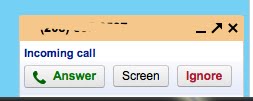
I can list my home phone, my business phone and cell phone as phones to ring when anyone calls my Google phone number. So if I leave the house and run to the coffee shop to meet with clients, I won't miss any business calls as all phones will ring. The home phone will ring, my business phone rings and my cell phone rings. Anyone calling my google phone number will automatically be answered, screened or ignored from any of the phones that I am near. I can picture myself having coffee out with a friend, cell phone laying on the table and it rings. The person on the other end would certainly think that they had called me at my business number, (the google number that I had given them) and would assume that I was hard at work in my office.
There are also other advantages to using this Google phone number. The first thing that you notice when you are assigned a google phone number is that you will now have a central area where all your voice mails can be retrieved. You can even get iphone apps or use your Safari browser on your iphone to access and listen to these voicemails . You can also opt to have the voicemails transcribed into text and then sent to your email address or have them sent as text message. The transcriptions are sometimes very funny as I learned. I was testing this voicemail transcription feature by sending myself a voice message and opted for the transcription as well. The results did not exactly reflect what I had said in the message, but it was a good effort.
The second advantage is the fact that you can also utilize your computer headset to call persons. You can click on any of your contacts in your address book, select a phone number and call a number. You can talk to this contact via the headset. Pretty cool. This is actually accomplished by using the Chat - Talk - Call feature that is found in the left-hand column of your Gmail window. You need to also download the plug-in for your computer in order to activate the Chat and Talk features for Gmail account. It seems confusing at first, but is easy to use once set up.
Here is the list of things you need to do to get google voicemail and talking via computer headset and such setup:
(1) Setup a Gmail account.
Get a Gmail Account
(2) Go to the Google Voice website and enter an area code, zipcode or vanity phrase to be assigned a Google Voice phone number.
https://www.google.com/voice
(3) Once you are assigned a Google Voice phone number a voicemail window will be displayed and you will enter options for forwarding to other phones or to your Google Chat - Talk (computer). You will be able to enter voice answering messages and features, as well as other options.

(4) Download a plug in to get Gmail Chat or Talk to work.
http://www.google.com/chat/video
(5) Go to your Gmail account and play with the Call Feature under the Chat on the left-hand side of the Gmail window. You can click on phone number in your contact list if you have one that it can automatically call or you can use the keypad.


Currently Google Voice is available for the USA and is free for calling in the USA and Canada. There are special rates for international calling. Tweet
phone number to try out. I had trouble accessing a number from Google in my area code. I had entered an area code for not only my area, but several other area codes from other states nearby, this did not return any resulting assignment for a google phone number. I tried zipcodes, which also resulted in a nil result. Finally I put in a 5 character 'vanity' phrase and was assigned a Google voice number. I was anxious to try out the features that I had heard so much about from blogs and fellow friends online. What was all this hype about Google Voice? It is my understanding that it is convenient in this day and age, especially for those with home businesses and startup companies to stay in contact with all their business associates and also their family and friends. It seems that most use google phone number as that single one phone number that they can distribute to everyone and then forward that phone to all their other phones so that they can be contacted at every moment of the day.
I can list my home phone, my business phone and cell phone as phones to ring when anyone calls my Google phone number. So if I leave the house and run to the coffee shop to meet with clients, I won't miss any business calls as all phones will ring. The home phone will ring, my business phone rings and my cell phone rings. Anyone calling my google phone number will automatically be answered, screened or ignored from any of the phones that I am near. I can picture myself having coffee out with a friend, cell phone laying on the table and it rings. The person on the other end would certainly think that they had called me at my business number, (the google number that I had given them) and would assume that I was hard at work in my office.
There are also other advantages to using this Google phone number. The first thing that you notice when you are assigned a google phone number is that you will now have a central area where all your voice mails can be retrieved. You can even get iphone apps or use your Safari browser on your iphone to access and listen to these voicemails
. You can also opt to have the voicemails transcribed into text and then sent to your email address or have them sent as text message. The transcriptions are sometimes very funny as I learned. I was testing this voicemail transcription feature by sending myself a voice message and opted for the transcription as well. The results did not exactly reflect what I had said in the message, but it was a good effort.The second advantage is the fact that you can also utilize your computer headset to call persons. You can click on any of your contacts in your address book, select a phone number and call a number. You can talk to this contact via the headset. Pretty cool. This is actually accomplished by using the Chat - Talk - Call feature that is found in the left-hand column of your Gmail window. You need to also download the plug-in for your computer in order to activate the Chat and Talk features for Gmail account. It seems confusing at first, but is easy to use once set up.
Here is the list of things you need to do to get google voicemail and talking via computer headset and such setup:
(1) Setup a Gmail account.
Get a Gmail Account
(2) Go to the Google Voice website and enter an area code, zipcode or vanity phrase to be assigned a Google Voice phone number.
https://www.google.com/voice
(3) Once you are assigned a Google Voice phone number a voicemail window will be displayed and you will enter options for forwarding to other phones or to your Google Chat - Talk (computer). You will be able to enter voice answering messages and features, as well as other options.

(4) Download a plug in to get Gmail Chat
or Talk to work.http://www.google.com/chat/video
(5) Go to your Gmail account and play with the Call Feature under the Chat on the left-hand side of the Gmail window. You can click on phone number in your contact list if you have one that it can automatically call or you can use the keypad.

When a phone calls you a window pops up where you will be able to answer the call, screen the call or ignore. When you ignore the call it will go to the voice mail. To view the voicemail or listen to it, you will access that from the Google Voicemail Window. It is a good idea to bookmark these two pages the Voicemail Inbox page and your Gmail Inbox page

Currently Google Voice is available for the USA and is free for calling in the USA and Canada. There are special rates for international calling. Tweet
Subscribe to:
Posts (Atom)