Showing posts with label Social Media. Show all posts

Saturday, June 25, 2011

Top 10 Reasons People Don't Use the Internet


1.) They don't know how to use it.
Whether they find it confusing or are simply set in their old-school ways, some simply haven't taken the time to stay up-to-date on the latest technology.

2.) They fear the internet.
With all of the sensationalized news reports of stolen identities, sexual predators, hacking, and viruses, many believe that they are erring on the side of caution by avoiding the internet.

3.) It's intimidating.
Some people are simply intimidated by new technology, including the internet. The idea of using the technical marvels of the internet is far from appealing, so it is avoided altogether.

4.) The internet isn't available.
Even in the United States, there are some places where the internet simply isn't accessible. Furthermore, some of the more rural areas only offer dial-up internet, and many feel that the high price for slow speeds and unreliable connections simply isn't worthwhile.

5.) They don't have a computer.
About one in five American households simply doesn't have a computer. Without a computer, internet use is fairly close to impossible.

6.) It's too expensive.
Many living below the poverty line are constantly struggling just to keep their heads above water. When faced with the choice between having access to food and having access to pictures of pets captioned in humorously poor grammar, the need for food usually wins out.

7.) The internet is too impersonal.
Written letters are more meaningful than email, and nothing compares to the feel of book pages turning under your hands. Some simply prefer the more personal touch of traditional communication methods.

8.) They don't see the purpose.
Just as some people never made the transition to television when it became available, some simply don't see the purpose of the internet and, accordingly, don't use it. With the internet's plethora of time-wasting social media sites, coupled with the hodgepodge of pointless games, they may have a point.

9.) They just physically can't use the internet.
It can literally be impossible for some people with physical impairments or disabilities to access the internet. Thankfully, there have been advances in accessibility technology over the last few years, but the technology can be expensive and difficult to learn and operate.

10.) The internet is the Devil.
Some particularly conservative religious sects exist that believe that playing card games or going to a movie theater can be the first step on the path of evil. The internet is perceived as the Devil's ultimate playground, and is shunned entirely. It might not be too difficult to sympathize, as nearly any innocent-seeming web search can ultimately result in some less-than-pure results.

Wednesday, March 30, 2011

Setting Up Custom Lists on Flipboard using Formulist

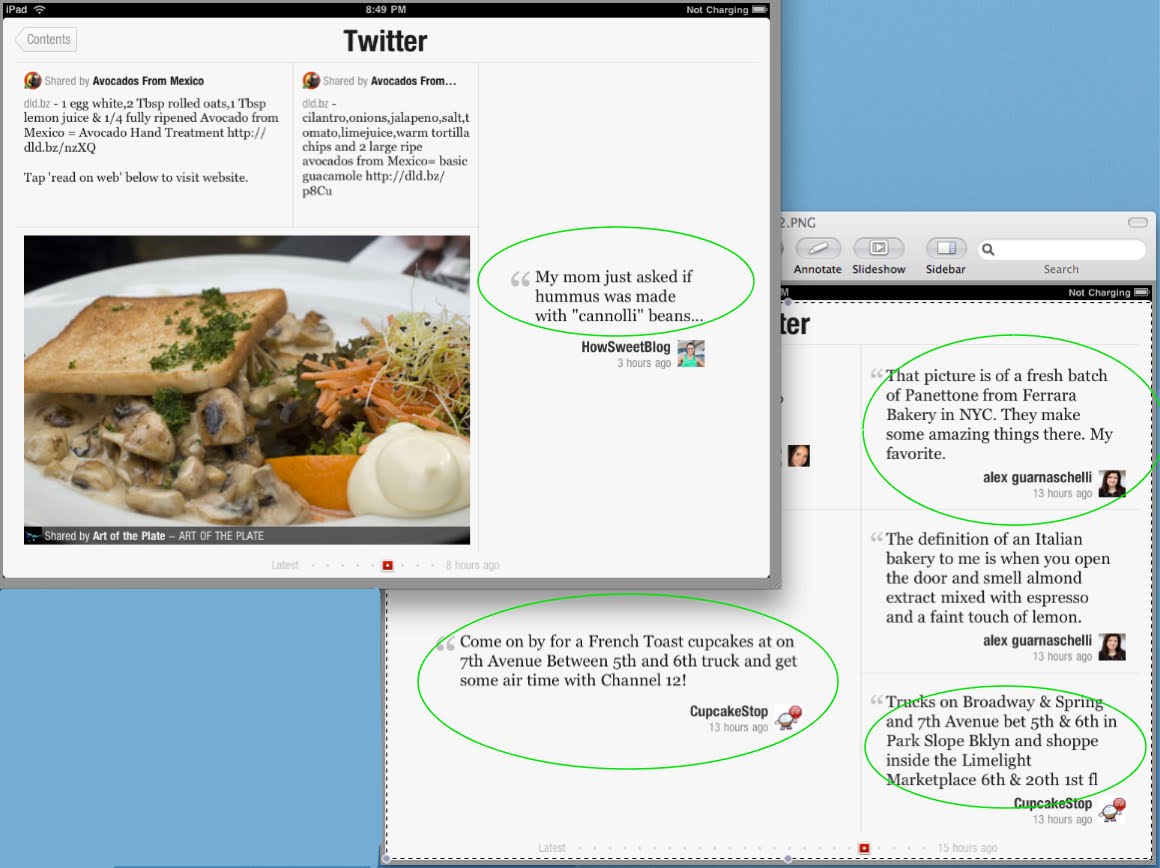
I am still a little frustrated with the fact that I can't use Flipboard to access my multiple Twitter accounts.  I decided to explore Flipboard a little further this morning, as they have continually added new features over the past year.

I noticed that you can Add Custom Twitter Lists.  Basically you click on the Add Section.  Scroll down to click on 'Add a Custom Section' (add any person, list or blog from all of Twitter).   You then enter the name of the list in the textbox and the Twitter List will now be available on Flipboard.  You can view the tweets from those people you follow if you set up a list of all who you follow.


Since I did not have a list of all the people I follow created on Twitter in my second Twitter account, I needed to create one.  Now this can be a tedious task to add each one individually to your list using Twitter.  I found a site online called Formulists which allowed me to quickly create a list of people I follow.  It even allows me to filter by certain criteria.   It is a pretty good site for setting up lists for Twitter.

First you sign up on Formulists.com using your Twitter account.  Then you select Add Lists and Select from a list category - I choose 'Filter Who You Follow'.    A screen appeared and I typed in the name of my list, set it to public, and then tried to save it.  It seems that you have to have one filtering criteria selected to create and save this list.  So I selected filter by location and just left the location info blank (as is) and then clicked on Create List.


A list of all that I follow was created and that is the list that I added to my Flipboard Custom Section.  This little trick allows me to view another Twitter account that I have, but in order to retweet or comment on this account I am only allowed to do so by selecting the accounts associated with Flipboard, which are my main Granny_Joan Twitter account and my Facebook account.  I can't at this time comment using another account that I have setup on Twitter.

Flipboard has so much potential and I am sure there is a reason they currently don't have the multiple Twitter account access.  I made a suggestion on their support site when they first released the product.  So guess I will continue to use other clients such as the Twitter app for iPad to be able to switch between my multiple Twitter accounts.  But occasionally, I will use Flipboard to view the tweets in a very unique magazine type format.

Sunday, January 23, 2011

Posting to Blogger using IPad and PhotoBucket App for iPad

This is a test of posting directly to Blogger by signing into Blogger site with Safari on iPad and typing into the text field.

In order to type in the text field of the Blogger post, you must select the HTML tab.

To post a photo here in this blog post required that i have the URL of a photo that was already stored on a photo site such as PhotoBucket.

Holding down the home and upper right hand buttons on my iPad I took the screen print of the window that appears when one selects the picture icon in the post editor of Blogger. This screen print was saved to my album on my iPad. I then used the PhotoBucket app for iPad to select that photo and upload to PhotoBucket. From that same app I was able to obtain the URL for that photo located on PhotoBucket.

I then selected the image icon from the Blogger HTML tab choices and pasted the URL for the photo into the box on the right-side. I then clicked on Upload and the HTML code for that image appeared in my post text box.

Previewing the post I was able to see the photo I wanted seen in my blog. I was able to edit my post directly in Safari using the HTML tab and links to photos from Photobucket app for iPad.


Note: I did find that when I published the photo the size exceeded my margins and I had to adjust the photo HTML size code by one-third.

I have not tried any specific apps for iPad that might be easier to use for non- techies, but understand that there maybe one that would work.

I was also successful in tagging the post with appropriate categories, editing the post from my iPad and also adding HTML codes for bolding text.

PS. I did this all while in bed enjoying the playoff football game. :-) now that is what I call multitasking.

Friday, November 19, 2010

Where's the Beef?

There is so much hype these days about 'branding' and how it should be utilized. Many of the expert social media gurus, point to the importance of using branding to get your company out there in the marketplace. As a result, most are jumping on the Facebook and Twitter band wagon to get their company and products known.

I must say that as an ex- small business owner, I realize the importance of making use of the internet to spread the word about your products. In most cases, small business owners have limited cash reserves to spend on big marketing campaigns. So utilizing the internet social network to spread one's name is pretty economical and easy for most to achieve.

Most of my business came from word of mouth and recommendations from of my customers to their customers, clients and suppliers. It was great and after the first year or so of heavy marketing and advertising fees, it was nice to put my resources into my production and let my customers do my marketing. In a sense, this is what Twitter and Facebook provide the small business man or woman. Nothing is better than having your customers recommend your product to their friends on Facebook or tweet about it on Twitter. In fact today, I made note of a company, explored their website and products on the recommendation of someone I follow on Twitter. Had I not seen their tweet about the service, I may have never discovered what this company had to offer.

In the past, branding was something that we saw in TV and radio commercials, that cost huge amounts of money. Just last night I was watching a great documentary about Dave Thomas the owner of Wendy's. I was intrigued with his life story, his achievements, hard work and innovative means to build an empire. He was one of the pioneers to utilize a successful branding that some will remember - Where's the Beef?

Not all small businesses have the means and money to pay for costly spots for Super Bowl TV ads and it seems to me that Twitter and Facebook are certainly a means to accomplish this for a lot less.

Check out this tribute to Dave http://www.wendys.com/dave/


Friday, September 17, 2010

Google Voice and Google Talk

I was finally able to obtain a Google Voice phone number to try out.  I had trouble accessing a number from Google in my area code.  I had entered an area code for not only my area, but several other area codes from other states nearby, this did not return any resulting assignment for a google phone number.  I tried zipcodes, which also resulted in a nil result.  Finally I put in a 5 character 'vanity' phrase and was assigned a Google voice number.  

I was anxious to try out the features that I had heard so much about from blogs and fellow friends online.  What was all this hype about Google Voice?  It is my understanding that it is convenient in this day and age, especially for those with home businesses and startup companies to stay in contact with all their business associates and also their family and friends.  It seems that most use google phone number as that single one phone number that they can distribute to everyone and then forward that phone to all their other phones so that they can be contacted at every moment of the day.

I can list my home phone, my business phone and cell phone as phones to ring when anyone calls my Google phone number.  So if I leave the house and run to the coffee shop to meet with clients, I won't miss any business calls as all phones will ring.  The home phone will ring, my business phone rings and my cell phone rings.  Anyone calling my google phone number will automatically be answered, screened or ignored from any of the phones that I am near.  I can picture myself having coffee out with a friend, cell phone laying on the table and it rings.  The person on the other end would certainly think that they had called me at my business number, (the google number that I had given them) and would assume that I was hard at work in my office.  

There are also other advantages to using this Google phone number.  The first thing that you notice when you are assigned a google phone number is that you will now have a central area where all your voice mails can be retrieved.  You can even get iphone apps or use your Safari browser on your iphone to access and listen to these voicemails.  You can also opt to have the voicemails transcribed into text and then sent to your email address or have them sent as text message.  The transcriptions are sometimes very funny as I learned.  I was testing this voicemail transcription feature by sending myself a voice message and opted for the transcription as well.  The results did not exactly reflect what I had said in the message, but it was a good effort.

The second advantage is the fact that you can also utilize your computer headset to call persons.   You can click on any of your contacts in your address book, select a phone number and call a number.  You can talk to this contact via the headset.  Pretty cool.  This is actually accomplished by using the Chat - Talk - Call feature that is found in the left-hand column of your Gmail window.  You need to also download the plug-in for your computer in order to activate the Chat and Talk features for Gmail account.  It seems confusing at first, but is easy to use once set up.


Here is the list of things you need to do to get google voicemail and talking via computer headset and such setup:

(1)  Setup a Gmail account.  
Get a Gmail Account

(2)  Go to the Google Voice website and enter an area code, zipcode or vanity phrase to be assigned a Google Voice phone number.
https://www.google.com/voice

(3)  Once you are assigned a Google Voice phone number a voicemail window will be displayed and you will enter options for forwarding to other phones or to your Google Chat - Talk (computer).  You will be able to enter voice answering messages and features, as well as other options.

(4)  Download a plug in to get Gmail Chat or Talk to work.
http://www.google.com/chat/video


(5) Go to your Gmail account and play with the Call Feature under the Chat on the left-hand side of the Gmail window.  You can click on phone number in your contact list if you have one that it can automatically call or you can use the keypad.  

When a phone calls you a window pops up where you will be able to answer the call, screen the call or ignore.  When you ignore the call it will go to the voice mail.   To view the voicemail or listen to it, you will access that from the Google Voicemail Window.  It is a good idea to bookmark these two pages the Voicemail Inbox page and your Gmail Inbox page


Currently Google Voice is available for the USA and is free for calling in the USA and Canada.  There are special rates for international calling.

Tuesday, September 07, 2010

NasaTweetup - What an Exciting Experience

It is with the deepest regret that I must notify you today, that I will NOT be able to attend the Nasa Tweetup to view the STS-133 Space Shuttle Launch.  

I have visited KSC twice and once to view a space shuttle launch from the causeway.  That launch was canceled due to weather restraints.  I was able to see a Titan Missile launch from KSC on my first visit, as well as take the tour of the KSC loop to view all the educational and magnificent space buildings and features. 

I am 63 years old and have grown up with the Space Program, in fact, it was because of the Sputnik launch in 1957, that the National Science Foundation and their interest in encouraging our young to pursue science and math in school, that I was funneled into math and science throughout my educational years.  I received a degree in Math and CS minor from University of Texas in 1969. 

I taught math and science in high school for a few years in Texas and Utah.  I started my own computer software company in early 1980's writing Engineering and statistical software and selling it world wide for both Macintosh and PC platforms.  I also had the opportunity to do some programs for a company that used a computer to drive a mechanical robot device that cutout parts for the 'booster rockets'. 

I have always had an interest in Nasa and the space program.   Unfortunately I will not be able to make this trip to Florida for the viewing.  I know that those that do will experience something very thrilling and memorable.  I have been fortunate in my life to have many such experiences:  visiting Antarctica seeing penguins and visiting Palmer Research Center, visiting Churchill on the Hudson Bay to view the Polar Bears, flying on the Air France Concorde and many more adventurous places in my travels since retiring.

It is nice to know that possibly someone who has not had the opportunity of this magnitude may be selected in my place to witness such an exciting and once in a lifetime experience.

Sincerely,
Granny_Joan (Twitter)

There are multiple ways you can follow the Tweetup and the launch:
 
·         Follow the launch and the Tweetup on Twitter at @NASA and @NASATweetup. We have created a Twitter list of those who are confirmed to attend. You can view the list and follow them at http://twitter.com/nasatweetup/sts-133-launch. You can follow the conversation using the hashtag #NASATweetup. You also can follow along in NASA's Buzzroom at: http://buzzroom.nasa.gov.
 
·         Don't forget to follow STS-133 crew member @Astro_Nicole!
 
·         On Oct. 31, NASA will use UStream to broadcast the first two hours of the Tweetup at http://www.ustream.tv/channel/nasa-television. We will announce the start time of the broadcast on @NASATweetup.
 
·         Launch coverage will be provided on NASA Television and online at http://www.nasa.gov/ntv.
 
·         Photos will be posted online during and/or after the event at http://www.flickr.com/photos/nasahqphoto.

Sunday, August 22, 2010

Increase Exposure for Your Personal or Home Business Using Technology

There are several ways to increase exposure to your personal or home business using technology that you already have or can easily apply.  Two main methods are through implementing social networks, as a member of Twitter or Facebook and by utilizing portable devices, such as an iPod Touch or iPad, laptop, or cell phones.

Social networks allow you to connect to both potentially new and current customers.  Using contests, you can generate interest in and create buzz for your product and services.   For instance, on Facebook, you can alert your friends and family that you run a business or service.

You can even create a Facebook page for that business, which will describe what you have to offer to all your friends - inviting them to join that page.  On your business' Facebook page for instance, if you run a computer repair business, you can offer a special code for 20% off a customer's first computer repair. This practice will entice new customers to try out your business and will help promote repeat customers.

For returning customers, offer periodic discounts, super saving coupons, contest or raffle. This type of selling practice will make sure that your customers continue to look at your page for the latest new and upcoming deals and promotions.  The extra exposure you acquire from these deals will likely lead to repeat customers.  Your business name will become 'branded' and stay fresh in their mind.

While social networks offer great services to advertise your products, other technologies also allow you to more efficiently and effectively run your business.   For example, for almost all phones there are expense trackers and "to do list" applications.  To run the best business, you should always enter the relevant information into your expense tracker and complete tasks on your "to do lists". With a mobile expense tracker, you can add purchases, such as new repair discs for your computer business to your tracker while you wait in-line to pay for these items.   The same applies to your "to-do list".   You no longer have to worry about carrying around a pencil and paper to keep track of your to do's.  There are many apps available to keep track of hours spent on services, as well as traveling expenses incurred for business deductions on your taxes.

Finally, you can use your technology and social networks simultaneously for a better overall optimal business solution.  And if you have investors, you can start a private or public page on a social media site, and keep them up to date on your activities.  You can also provide customers with knowledge of local activities that relate to your business, as well as support for your product or services.  For instance, if you are showing off your business at a job fair, you can use a GPS locator on your phone to send your location to potential applicants. These applicants can then visit you by following directions from your Facebook page. Or, they can just submit their applications from home to your social media site - how easy is that! 

If you use technology and social networks correctly, you are sure to gain better exposure for your business while running it more effectively.  By utilizing social media sites, small businesses can gain needed exposure at little to no costs, which gives them a chance for a more even playing field in today's advertising market.  Social media sites can provide the branding and interaction with customers needed for a successful business.

Friday, August 13, 2010

Flipboard - a Magazine Featuring Me!

I blogged on the topic of  Multiple Account Access in Flipboard a week or so ago.  I was having trouble searching my Twitter account in order to add that account strictly as an additional one of the nine sections offered on the Flipboard layout.   I kept getting an empty search result.

Today, I clicked on an empty section in the Flipboard layout to add my account.  Instead of searching for Granny Joan or Granny_Joan, I typed in @granny_joan into the Search Field and it found me.  So I added myself to the section and was able to obtain my own magazine featuring me alone.

 Here is what the first page of the magazine looked like when it loaded.  Now I am able to view both of my Twitter Accounts inside Flipboard layout.

If you want to checkout your own magazine or add someone particular in a section of Flipboard, give it a try.

Just type in @yourtwittername into the Search Field of Flipboard Section.

What is Microblogging?

What is microblogging? How do you potentially use it for businesses or personal notifications?  How to set up a blog using only portable devices, and what type of things you should/can you blog about while on an airplane, in a hotel, or on the road?
Thanks to microblogging websites and platforms, it's possible to share bite sized updates about your life and follow the updates of people who matter to you via the web. Today, many people have become addicted to their phones, read several blogs every day, and have contacts all over the world. People hear about microblogging and usually denounce it with harsh criticism, but after they give it a try, they sign up for free and realize that microblogging platforms look a lot like regular blogs! They notice that each page is personal and has updates from friends. People are also using microblogging platforms for business ventures and more. The microblog world has unlimited potential for everyone from the casual user to the business owner.

Fortunately, people use blogs to say more than just "buy my stuff, buy my stuff".   That being said, Twitter CAN be used for marketing.  There are several ways to use marketing techniques on blogs and all you have to do is apply them. Some people are interested in leveraging particular markets but it's all a matter of personal preference.   If you want people to consider your business you must advertise properly using real information, not spam.  Essentially you have to fill up your blogging gas tank with your niche's information.

The proverbial 'filling up your gas tank' entails collecting potential articles, keeping your friends and followers informed with the services provided by the particular platform, finding relevant pictures and just generally writing about the products in your market. Your blog should be about keeping your market up-to-date, which is one of the steps to eventually being a leader in the marketplace.   but let's not get ahead of ourselves, before you lead you have to first understand.

And here's the big hitter: The exciting thing about microblogs are that they are compatible with many mobile devices, which means if you have ever wanted to post to your blog but weren't by a computer, you are in luck. It's actually very simple and all you need is a cell phone with text or media messaging capability, any smartphone or regular phone will do.   Additionally, if you can blog from your smartphone, that means your market will be able to read your blog from their smartphones.

There are several ways to write a blog message from your phone, the first is to write a post with the text messaging function. The number to send it to is usually a numerical translation of the website (such as 256447 for blogger). Another  way to post is to take a picture and send it as an e-mail which uses a different method to deliver than the text messages.  Or try using some of the audio blog sites like Cinchcast.com to setup a blog with audio, pictures and captions.  Cinchcast.com can be utilized from landline phones or any cellphone by calling a number an leaving an audio message.  Cinchcast.com also has an Apple iPhone app that works with iPads, iPhones and iPod Touch devices, as well as an Android app.  With these apps, you can post photos, type in a title or caption, and leave an audio blog or message, publish it to Twitter and Facebook with the nice interface in the app and also listen to your followers replies and comments to your blog and to their blogs.  Check out Cinchcast.com 


All of these functions can be performed in some of the most remote locations such as hotels, the beach, and the Empire State Lookout.  Even planes have signal services (gogo) while most of the world's terminals have wifi, though some restrictions may apply.  So kick back and relax at any place with a signal, and get your blog on.


Tuesday, August 10, 2010

Are You Confused By Internet Slang?


Each generation has there own slang that they use to communicate with their peers.  It is interesting to note that the netizens have their own terminology as well.  Some of these new terms are defined (my interpretation) below:

Netizen - those persons who spend a lot of time on the internet and are referred to as internet citizens or members of that 'virtual' society.

Meetup - a group of like-minded individuals, possibly netizens, that have same interests such as careers, companies, hobbies, or interest in politics, health, music, etc.  This group secures a location, time and arrangements to 'meet up' in the 'real world'.

Mashup - web application, web function, or application that mixes various media sources such as graphics, text, audio, video, etc.  In the music industry a mashup consists of a musical genre or category that consists of new songs that are a mix of parts of other songs put together.  This could also be the result of a meetup.

Mixup - confusion of not being able to mashup or meetup.

Markup - designation of increase of price for product or service to meet one's profit margin.  Also could designate the changes in location, time and arrangements for meetup.

Meltdown - when things tank or collapse.  Possibly could occur when netizen remembers he forgot the meetup.

Bailout - what a company that doesn't have enough money might wish to obtain to avoid failing or when a netitizen doesn't show up to a meetup.

Wiki - quick and easy way to access information and content all in one place.  (Kind of like a meetup)

Link Rot - when a URL (Uniform Resource Location) or address of a web page becomes obsolete.  When the place designated for the meetup is no longer there. 

Spiders - computer bots that roam the www updating search engines, obtaining new pages, deleting obsolete pages and updating known pages to a database.  It could be possible that some of the netizens that observe at meetups, might be considered spiders that listen, learn, obtain, delete old ideals and update to new ones.

Twishing - a new means by which some persons are using Twitter to phish or steal identities.  Twishers might be netcitizen at a meetup that steals ideas and tweets them to the world.

:-)

Monday, August 09, 2010

Copyright and Patenting

It is obvious that the internet offers numerous types of bloggers.   You have those bloggers that inform, recommend, steer and encourage others.  And you have the bloggers, that seem to continually stir the pot so to speak, by warning, dissuading others by always blogging in a manner that is negative.

The second type of blogger, I shall call the attention seekers, for lack of a better phrase to designate their existence.  These attention seekers, rather than spending time on constructive projects and their time in helping others, they spend their time in criticizing others or finding fault in products or other persons.  I am not sure if it is because these individuals lack the creativeness to pursue positive and substantial activities or if they have always been the type of individual that receives attention only from their negative actions.

Some parents only reward their children attention, when they misbehave.  These same children when they become adults, continue to act like misbehaving children to get attention.   You know the type of bloggers, the ones who post conspiracy theories about historical events or those who comment or reply to other bloggers in negative manner so as to get a rise or insight drama over a topic of discussion.  The wise learn to avoid responding to these type of comments and often find the blogs that they produce to be a waste of time to acknowledge.

Today I heard a blog about a company stealing ideas from developers and patenting them.  I suspect that the article was written to insight drama and to gain attention to their blog.   It is obvious the person writing the blog, has no concept of business in general.   What I would say to this ... if you are a developer and you have not patented or copyrighted your materials and ideas, then it is your fault.  Any intelligent developer or entrepreneur knows the first rules of developing a site or application is to protect your proprietary property by use of patent or copyright.   

Back in the day, it was well known by early pioneers in the developing computer fields that you didn't show your products to others in the field, as ideas are often stolen or copied.  This has occurred since day one and will continue.  I would say protect your ideas.  Keep the lid on your ideas until released.  Don't think also that you are the only person that has come up with the idea of the paper clip or 'to do list' app.   It is possible that others may think of the same applications, ideas and sites that you have thought of ... but the first to patent or copyright has the privileges to claim them.

I own several copyrights on software I developed in the 1980's.  That was one of the first actions I took when I launched my software and company ideas. 

What is an Entrepreneur?

I’ve been trying out a few new beta sites online and am enjoying the brain workout: testing the features and options on these sites.  I test out beta sites for young entrepreneurs, giving them bug reports and suggestions for their sites and products.  In order to really supply the developers and site-builders with adequate information about their site, you must really use their sites.  You must try out all the features, options, and utilize all the gizmos that they provide. 

For these developers being an entrepreneur isn’t easy, but it is exciting and fun.  But it is also very time-consuming.  I know I have been there myself.   I know that starting a business on limited resources and little cash can be stressful.  Since I am retired and familiar with the internet and small business, I offer my services for free.  Not only do I enjoy helping others, but I find that it keeps my mind active and current with things happening on the internet and the latest technology.

The thing that amazes me the most about these sites, is the knowledge and talent of these young entrepreneurs that have such a vision of the overall internet and what will work in the new internet of the future.  My definition of an entrepreneur has always been as follows:

You know a person is an entrepreneur if they are the type of person you meet and when you engage them in conversation, you are lost in understanding their vision.  They are the type of persons that have such a grasp of what will happen in the future, how things mesh together, what people will be using in terms of technology.  To the average person, what they talk about or envision seems almost sci-fi or something out of Star Trek. 

It is refreshing to know that we do have a few amongst the up and coming generations that are outstanding, talented and knowledgeable and carrying on with dreams and visions of the internet of the future.

Wednesday, August 04, 2010

Multiple Account Access in FlipBoard

I think everyone that uses FlipBoard likes seeing their own articles in print so to speak.  The first thing I noticed about FlipBoard was the lack of multiple accounts for Twitter or Facebook.

I noticed that when something goes wrong the users bombard Flipboard's Twitter and Facebook with messages and comments.  It has always been my experience that the best way to get feedback and results is to use a site's support page.   Flipboard has a site that allows the user to post comments, topics, questions and suggestions.   That site is at:  http://getsatisfaction.com/flipboard.   While exploring the site, I put in a request or suggestion for multiple accounts.  I immediately got a response that they would consider this request.

In the meantime, I have been trying to figure out how to view my Twitter pages on Flipboard.  Fortunately one of my Twitter accounts is search-able and I was able to set up an entire stream or 'magazine' of just my articles.  This allows me to see the format of what other followers might be seeing and to improve on the layout, photo placement, etc. 

Today I realized that if I sign up for one Twitter account and that Twitter account follows my additional account, that I could see the articles and layouts for the second account.  This is a workable solution for me at the present time.

I must say that FlipBoard has their hands full with all the new users and requests coming their way.  Guess they will have a busy summer and fall.

Saturday, July 31, 2010

Are You Using Social Networking to Do Your Marketing?


Many agree that marketing and advertising strategies are changing.  Statistics show that a large number of consumers are now using the internet to do their shopping on-line.  So it is imperative that companies and advertisers, whether large or small, make use of the internet to get their message across to consumers. 

The old methods of advertising by using bill boards, TV ads, Radio spots and magazine articles will soon be ineffective.   More and more companies are utilizing the features of the internet to capture the attention of their customers and potential buyers.

The best way to get your product out to the world happens to be through online marketing techniques.  Today if you are a small company and you can reach your target audience via the internet, you can be nearly as effective as larger companies.  It isn’t necessary to have a large marketing budget to compete in the advertising arena.   The key to advertising and marketing success can be the viral nature of the internet.  Reaching a few target groups via Facebook or Twitter or other social networking sites can increase your audience exponentially via ‘word of mouth’.  There is no better advertisement than having friends spread the word about your product to others through utilization of internet social networking sites and forums. 

Companies can set up online sites, with blogs, newsletters, coupons and offers that will attract consumers to their site, where they will be able to absorb information about the products and in some cases purchase the items on the spot right on the site.   Companies will have to employ innovative and clever new techniques and ideas to attract new buyers and loyal customers.

The old strategies of marketing and advertising are changing and companies need to be in tune to the exploding market that is opening up rapidly on the internet.  They must be ready to adopt new techniques, strategies and approaches to the new way of reaching consumers.  There will be a need to be innovative and in-touch with customers in a more direct manner.  It is happening now on Twitter and Facebook and many other social networking sites, as well as through iTunes App Store and the new exciting Flipboard app.  The mere phrase ‘social networking’ describes the future of not only socializing for friends and family, but for companies and consumers.

Sunday, July 25, 2010

The Next Generation of 'Teksting' - Texting Perfect for 6 Year Olds

As my daughter has received her new iPhone 4 to replace her 1st generation iPhone, I suggested letting the 6 year old techy wiz kid use it.  She was a little hesitant, but I see no harm.

You can set up only what apps, contacts, etc that they can use and restrict some of their capabilities and of course, eliminate the actual phone capability.  There are some great logic, chess and fun educational games that they can enjoy.

Since I have decided to join the 'texting' world and am using a free app called 'TextFree Unlimited' to text my daughter, she decided to leave that on the granddaughters iPhone.  She has been 'Teksting' me all morning and it is cute to see someone who has just learned to read, type and text like the best of them.  Her phonetic spelling is amazing and love the fun spellings that she is using.  It is almost like texting with a teenager.

Here is a sample of the conversation this morning: (luckily the TextFree Unlimited App gives us unlimited texting and works great for my needs)

The last series of texts were 'Tektst Me' ... 'Tekst Me!'  .... then the 'Tekst Me!!!!!!!!!!!!!!!!!!!!!!!!!!
LOL, she has learned to express her self with the texting already.

Be sure to check out the TextFree Unlimited app http://itunes.apple.com/us/app/textfree-unlimited-send-text/id305925151?mt=8 it allows unlimited texting, others who aren't signed up with the service can text you at the textfree assigned phone number, has some customization, ads are not intrusive.

Wednesday, July 21, 2010

FlipBoard - Magazine Viewing on Your iPad - Hiding Some Articles


I downloaded the Flipboard app and was amazed at the quality and ease of use on my iPad.  It offers the user the ability to customize magazine for reading and viewing articles and photos, from Twitter and Facebook feeds.

You can add your own Twitter and Facebook feeds to the sections, however, as most young up and coming startups, the servers are quite overloaded on this first few days.  I believe that they have stated that they might do an invitation list to alleviate this strain on their servers and control the onslaught of new users for the app.

I have noticed a couple of interesting features that might not be so obvious to the user.  If you are fortunate to add your twitter account and start receiving articles in your newly created magazine, you will notice at the bottom of the page that there is a time line with dots, allowing you to search from latest to previous magazine articles.  At the present time, I haven't been able to go back much further than yesterday on their time line.  This will certainly be nice if their servers can handle the archive in a manner where you can retrieve back articles in your endless magazine stream.

Another thing that I noticed was that I was getting a stream of most of the people I am following on Twitter.  Now, I like to follow and sometimes ignore some others that are basically, what I consider as spam accounts.  I noticed that you can select a 'contributor's name' on a page and then click in the upper corner icon which looks like a square with curved arrow or reply icon.  You can reply to  an  article or photo right from the Flipboard app on your iPad.  You will also notice, a red button labeled 'Hide'.  This will be an important button for hiding those tweeters that you don't want to show up in your Flipboard magazine.  You can also retweet and share via email the article from your customized Flipboard pages.

If you choose to Hide a contributor and wish to change your mind and reinstate their articles, merely click on any contributor in your Flipboard magazine and the option to hide that contributor and a list of thoses you have hidden will appear and you can toggle back to Show. 

I also noticed a thumbs up (like icon), so I am assuming that there will be some sort of favorites rating system for your customization.

Flipboard also has a Facebook, Twitter, website and uses Get Satisfaction Support Board.  I shall enjoy exploring this innovative app and using it on my iPad.

Check out FlipBoard

Monday, July 19, 2010

Have We Lost the Art of Communication? I Say No!

Once upon a time, communication consisted of talking to one another in person, over the phone, or through letters in the mail. Now almost a century later, communication has drastically changed into something different yet exciting. With sites like Facebook and Myspace, video chatting sites like Skype, and the use of email, people are able to talk to each other in a new kind of fashion. Many people believe that this is a sign that we are losing our communication skills, but I tend to disagree with them.

Social Networking sites, video chatting sites, and emailing opens up a new way of talking to people. The art of being able to send a message, pictures, or even videos in a matter of seconds gives everyone the ability to keep in touch with friends who might be down the street or even oceans apart. Even though this may not mean communicating in person - you still learn valuable social skills. You have complete control of who you can and cannot talk to, the ability to make new friends, and the ability to find long-lost friends. Whether it be a high school sweetheart or your college roommate, the internet opens up a barrier for people to find their buddies that may have been lost in the sands of time.

Another concept that people believe is dying a slow and painful death, is the art of hand-writing personal letters. I believe that this is not completely lost, but has grown into something completely new. Letters may not all be hand written nowadays. With programs like Word, you still learn how to format letters, and write clear and coherent sentences. Even writing emails and instant messaging on Facebook can teach you these valuable lessons. Texting terms like 'LOL' or 'BRB' may not be proper grammar, but each generation has had their own ways of communicating with their friends and this does not pose a threat to communication.

So should we be worried that communication skills are dying in this generation? I believe not. They have just grown and evolved into something everyone can use and enjoy to this day. We shouldn't be worried about this, but instead be excited for what the future of communication holds in store for us. Over the past century we have gone to writing letters by hand that can take weeks for the receipient to receive, to the wonders of the world wide web, where messages reach their destination in a matter of mere seconds. Every generation has learned to communicate in a totally different way, and even though this particular generation may be communicating through small screens sitting on a desk or on a cell phone, does not mean we have lost the art of communication. It is just growing into something bigger and better for the rest of humanity. Who knows what the future has in store for communication next? Maybe 'Star Wars' like holograms that can be sent or even the use of teleporters. This may sound a bit too science fiction, but who knows? I, myself, can't wait to see what will happen in the coming years.

Saturday, July 10, 2010

The New "Social Security" - Do we really have less privacy today than we did in earlier times?

In today's world, people are incredibly concerned about privacy and, particularly, privacy of personal information. Ironically, it is also more common these days for people to post their personal information on the internet via social media and social networking sites. Many people fear that this rise in the use of social media and social networking has translated to less privacy than in the years before the rise of the internet; however, in the past, personal information was regularly posted in newspapers and phonebooks without the benefit of the personal privacy controls offered by most websites.

Although it might seem that privacy has become a problem these days, it is actually no more a problem than it was in the past. When people post their personal information on most social networking websites, they have the option of personally choosing who views that information. Most websites offer extensive privacy controls that are simple to use and are extremely beneficial for protecting personal information. One can be extremely specific about who can view what information and, of course, people can choose to withhold information that they don't want anyone to see. It is up to each individual person what information they would like to share and with whom they would like to share it.

Before the rise of the internet, personal information was routinely shared in phonebooks, newspapers and public records. Much of the information that people fear sharing online today, including addresses and telephone numbers, was, and likely still is, accessible in paper format. Phonebooks include a great deal of information that people are loathe to share on the internet in a format that is readily accessible to a wide variety of people. Additionally, newspapers have routinely included personal information, including full names, ages, and addresses, among other things, in various articles and announcements, including engagement, marriage, birth and death announcements. Typically, people wouldn't think twice about including this sort of information in announcements submitted to a newspaper, but are extremely concerned about putting this information on the internet. Also, public records contain a great deal of personal information that is easily accessed by a variety of people.

While many people have become more concerned about privacy and sharing their personal information with the rise of the internet and social networking, the truth is that privacy is no more a problem than it was in the past. In fact, people may even have more control over their own privacy now. First of all, people have the ability to pick and choose what information they provide to social networking sites and can even choose to completely avoid these sites altogether. Additionally, people can make use of the extensive privacy controls offered by most major social media websites to regulate what information is accessible and what information is not accessible. In the past, in deciding whether to share your address and phone number, you could either put it into the public phone book or keep it entirely private. Nowadays, you can provide it only to friends and family, if you so choose, by making it visible on a social networking website to only a certain group of people. This advancement actually further protects privacy, rather than violating it. Contrary to popular belief, personal privacy is no more an issue now than it was in the past as long as individuals are smart and conscientious about the information they share online.

Thursday, July 08, 2010

Why Do Teens and Adults Use Texting?

Have you ever wondered WHY do teens and adults use texting? WHY is texting more popular than the old email or phone call methods of communication?

Texting has become increasingly popular because it is an easy way to casually communicate and convey information. It has been replacing some more traditional methods of communication because of its convenience and reliability. It can also be a lot of fun.

Many people believe it is less of an imposition to receive a text than a regular phone call. When one receives a text, he can look at it when he gets around to it. He feels much less social pressure to respond right away, or even at all.

If a person only has a small bit of specific information to communicate, texting might just be the most effective tool. Phone numbers, names and addresses, and directions can be sent quickly and accurately.The sender can be confident that the message arrived exactly how it was sent. Over the phone, numbers can be heard or written down incorrectly, or forgotten completely. A text is there in a tangible form long after it was sent..

Texts have many things in common with e-mail, but the recipient isn't always around to get it. E-mails can go for days and weeks without being read, or even caught by spam filters and never seen at all. A SMS message will be sent directly to the person the sender is trying to reach.

Computers can also be used to utilize text messaging in ways that they have a hard time doing over the phone. Computers can automate the sending of various content like emergency alerts, news, pictures, songs, directions and other information.

Computers can also receive text messages in a format they can easily process. This allows people to send messages to automated services and instantly update web sites, get information about bank accounts, make purchases, pay bills, get information services, and more.

There is a social aspect to texting, too. Text messages have their own slang, jargon, and ways of getting the message across. When a person use these tools effectively, she announces that she is part of the texting class. Most people haven't stopped to think about it, but there is a very real drive in all of us to broadcast this information.

Texting is often an excuse to pull out one's latest toy and let one's friends and co-workers gawk and envy them. It's easy to strike up a conversation about one's phone when somebody comments on it. And chances are, a new phone will be one of a person's favorite subjects.

Texting can also be used to send jokes, pictures and videos to one's friends. Texts often manage to make their way through an entire social circle one person at a time. People have a lot of fun doing this, and it brings "viral" qualities to the SMS format.

There is no one reason why everyone is sending texts these days. It's a matter of convenience, efficiency, social considerations, and sometimes just plain fun. Regular phone conversations and e-mail won't be going anywhere any time soon, but texting is definitely here to stay. It may soon become more common than either, having advantages over both.

Sent from my iPad

Wednesday, June 30, 2010

In With The New - Out With The Old - Ways Internet Changes Our Lives

Technology is finding its way into the most basic chores and activities of our day-to-day lives.  Time has become the most precious commodity.  The quest for knowledge is pushing man to try newer and faster ways to address questions.  The internet has become the largest store house of information with easy access in most cities of the world.  Now it holds the key to a whole new world of knowledge and a different life altogether.


The use of the internet is different for different individuals, and internet habits are influenced mostly by the age of the person.  There are amazing things the internet has to offer.  The following are some of the ways that the internet has changed our lives:

Internet Gaming:  Playing games on the internet is perhaps the most common activity people of all ages utilize.  Social gaming is also gaining popularity these days.  This results in empty parks and playgrounds, as both children and adults alike find gaming at home, far more attractive than going out for a walk or playing with friends.

Educating Children:  With a variety of knowledge available on the internet, parents find it easy to use the internet resources to educate their children.  It is far easier to show them a picture of a butterfly, than to go looking for one in the park, though the latter would be far more interesting.

Social Networking:  Gone are the days when a college reunion or a town get-together is a must attend event to see old friends and classmates.  With the advent of social networking sites, connecting with friends is far more convenient via uploading pictures, sharing one’s status on one’s profile and an occasional hello, chat or instant message to long-lost friends.

Online Dating:  Internet dating has become a wonderful way for many to find their soul mate.  The process of going up to a prospective partner and asking him or her out on a date has been replaced by contacting the person online, looking up their profiles and then if everything goes well, meeting in person.  The internet gives a person the opportunity to meet a larger number of persons, thus providing more choices for the perfect soul mate.

Shopping:  People shop on the internet for basic items like groceries to expensive items like furniture.  It is considered fast and convenient.  One disadvantage is that it replaces the fun of having a girls' day out window-shopping, gossiping and chilling out with your girlfriends, which most women find therapeutic and enjoyable.

Sending Greetings:  The days of sitting together with the family, addressing holiday cards and mailing them to distant relatives and friends are gone.  Internet greetings make this task simpler by the use of e-cards, but this also takes away the fun of the holiday spirit of personalized hand-written cards arriving at our doorsteps.

Sending Letters:  Waiting for letters from loved ones, no longer means rejoicing at the site of the mail man's arrival.  Just one beep on your computer lets you see new mail from your dear ones without any wait.  Emailing has never been simpler than what it is now, sending everything from hugs to kisses.

Organizing Parties:  Planning an event becomes an easy task these days.  With just a simple click of the mouse on the computer, you can plan huge events.  Communication and payments to caterers and decorators can all be taken care of via the internet.

Searching Places:  Internet map access is a popular tool, that allows you to find the exact location rather than asking friends for directions or information.  With internet maps there is little need for hardcopy maps in our cars and fighting the task of refolding maps.

Sending Gifts:  Many people make their presence felt at an event, by simply ordering a gift and having it delivered to someone to make up for their absence at the event.  Most commonly, such events are weddings.  One does not need to even take a step out of the house for gift hunting or delivery service.

Selling Old Stuff:  Yard sales are becoming a thing of the past.  Selling old and used items over the internet is much easier and offers security.  So it is possible, that 'yard sale' signs in the neighborhood may disappear in the future.  One can buy or sell anything over the internet, from small items like collectible toys to larger items like cars.

Buying and Selling Real Estate:  Want to buy a house? No need to step outside.  Just log on to the internet and one will find a whole list of houses for sale.  People who want to buy or sell their real estate can use real estate sites as a secure option and with wider exposure for their properties.

Watching Movies:  Sitting in the comfort of one's home, people can buy or rent movies online and even watch them on their computer. The market for online movies is huge.  So the next time you want to watch a movie with your family no need to run to the DVD store, just go to the internet, set up an account and have the movies delivered to your doorstep or downloaded from an online streaming service like Netflix or Hulu.

Talking on the Phone:  Sounds unbelievable, but it is true.  The latest innovation to hit the consumer market is the use of internet phone services to talk to your loved ones living in a foreign country or next door.  This is a wonderful innovation, as it greatly reduces the distance between people and one does not have to wait for months to hear from their loved ones staying in a different country or on a different continent.  You can use Skype or iChat or similar VOIP type sites to communicate and even view your love ones and friends via computer.

Working from Home:  Earning money from a home job or having an internet job is the most convenient way that you can find employment.  This is made possible because of the internet.  This is most useful for people who can't leave their homes every morning, because of obligations to small children at home or elderly people who need constant attention.  So having a job, now does not necessarily mean one has to leave home and travel to a different location.

Adult Education:  Online education is a wonderful way in which people may use their free time to improve their educational skills and to earn diplomas and degrees.  This greatly reduces the effort of having to travel to and from a college or university.  People who find this most useful are those who want to work part-time, while studying.  Learning transcription, sewing, and cooking are just some of the many things one can learn online.

Exercising:  Online yoga and workout lessons are the best way to stay in shape without leaving the comfort of one’s home. Many women use the internet for online gym lessons to get back in shape, especially after child-birth, when it is not possible for them to leave their small children at home while at the gym.

Makeovers: Every person likes to change their looks once in a while.  The internet is used by many to get tips and ideas for styling and fashion.  There are many websites which offer a trial look before one goes for a makeover, so that many fashion disasters are avoided.

Finding a Job:  Job hunting over the internet, preferred by many, offers access to multiple job search websites, connections to many people and to many available jobs in your preferred area of expertise.