There has been a lot of posts about
iTunes 10
not allowing custom ringtone creation.
I found that I was still able to create a ringtone from my favorite iTunes selections by using the following method:
(1)
Select the song in your
iTunes
library and then using
cmd I to bring up the information box about that song. Click on the
Options tab and then check the '
Start Time' and enter '0:40' for the '
End Time' for that song or some interval of the song clip that is equal to or less than 40 seconds.
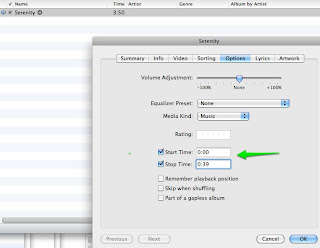
(2) Select that same tune in your iTunes library and
right click (using a Mac) to bring up the contextual menu and select '
Create AAC Version'. You should then notice the addition of the same song in the iTunes list with the shorter time length.
(3) Select the short version of the ringtone from the iTunes list and then hit the delete key. The option to 'Remove' the file will then be selected and the option to 'Keep File' should be selected at this time.
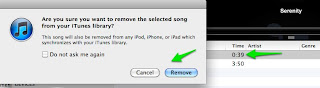
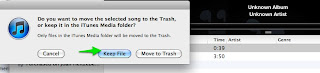
(4) Bring up a finder search window and type in the name of the song, until you locate the file that you kept which is located in your iTunes library and has the extension .m4a
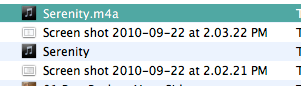
Using '
cmd I' bring up the
Get Info window for this m4a file and
change the .m4a extension in this information window to .m4r
(5) The file that is located in the directory should now have .m4r as an extension and by double clicking on this file, it should automatically be loaded into the Ringtone Section of iTunes as illustrated below:
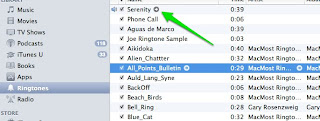
You can rename the ringtone by clicking on the name in the iTunes directory if you wish.
(6)
Connect your iPhone
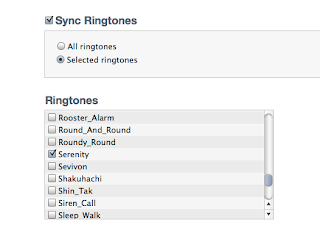
to iTunes via cable and then sync your new ringtone. Remember to select that ringtone in the
Sync Ringtone tab when your iPhone is connected and then click on
Apply or
Sync.
 app one can set up a rule to do so.


 has a convenient feature to allow the user to switch
 during a conversation. Say you have answered whoever called you on your computer headset and you were just about to leave to run some errands, but want to continue the conversation as you head out the door.


